


As a result of the COVID-19 pandemic, companies had no choice but to implement working remotely for apparent health and safety reasons. It made perfect sense at the time, but is it an excellent long-term work strategy? What is the remote work status after four years since the pandemic began?
This article will try to answer any questions about what remote work means and what it involves, so you can adapt faster to this trend that has become the “new normal.”
With little to no time or resources to invest in training newly remote employees, this guide remains your go-to source for handling the challenges that hinder your productivity when working from home.
I will focus on the key insights for this topic so you can adapt and advance professionally as an employee, team leader, or CEO if you choose this work style.
Key Takeaways
- Remote work is a new reality of the post-pandemic workforce
- Working remotely requires a specific skill set that you can develop
- Remote work boasts various benefits, but it also poses some challenges
- If you understand remote work challenges, you can mitigate them
- Remote work boils down to best practices, processes, and digital tools
- Remote work will adapt to future work realities, as it has already massively changed in the past years
What is a remote job, and what does remote work mean
The concept of remote work is not novel. According to the Cambridge English Dictionary, “working remotely is the practice of an employee working at their home, or in some other place that is not an organization’s usual place of business.” Working from home is a form of remote work and may differ significantly from working in a coworking space.
Whether you work from home or a coworking space, in a fully remote role, or on a hybrid team spanning multiple time zones, there are pros and cons. I’ll cover the key challenges and successes of working remotely.
While working remotely, the constraints of an in-office environment are no longer an issue. You have some flexibility in choosing your location, devices, and, most of the time, even your work schedule, unless your company’s remote work policy states otherwise.
In accordance with company policies, you may arrange your work schedule. For example, if you are not a morning person, you can work your required hours on a solo activity in the evening.
Remote work statistics
Given the sudden and unexpected rise in remote workers during the pandemic (up to 55% of employees across industries), telecommuting is here to stay, at least in part. We’ve outlined 21+ surprising remote work statistics in this working-from-home thought piece.
I’ll touch on a few stats on remote work.
According to Gallup, as of 2022, “long-term, fully remote work arrangements are expected to nearly triple compared to 2019 figures.” However, the most significant trend that will dominate the workplace post-COVID is hybrid work, with 49% of full-time employees adopting this work style as of June 2022, and an expected increase of 55% in the following years.

Gallup – U.S. Employee Work Locations
Remote work is here to stay. The academic consensus is that remote work is here to stay and has become a fixture of the U.S. job market—and beyond. In a study by Buffer, 98% of respondents responded positively to remote work and preferred it throughout their careers.
In other words, employee consensus indicates that 98% of employees would like to work remotely for the rest of their careers, at least some of the time.
Goldman Sachs studied the distribution of remote employees three years after the pandemic lockdown, which forced the global workforce to work remotely. How many people work from home at present? That depends on the source:
- Pew Research Center estimates that about 14% of US-employed adults always work from home.
- Forbes Advisor reports that as of 2023, 12.7% of full-time employees work from home, while 28.2% work a hybrid model.
- Stanford University‘s monthly study on working from home found that 27% of paid full-time days were worked from home in early 2023.
- Bloomberg reports that fewer than 26% of US households still have someone working remotely at least one day a week, a sharp decline from the early 2021 peak of 37%.
- Goldman Sachs estimates that the share of US workers performing at least some work from home remains at 20-25%, below its peak of 47% at the height of the pandemic but well above the pre-pandemic average of 2.6%.
While in 2019, an average of 7% of paid workdays were worked remotely, this climbed to 28% by September 2023.
By August 2023, 13% of full-time employees were fully remote, 57% were full-time on-site, and 30% were in a hybrid arrangement.
That’s it with the numbers. In this next chapter, I’ll help you determine whether working remotely fits your work style and how to reconcile the two.
Does remote work fit your work style?
And if not, how can you adapt?
Many people want a more flexible work schedule. Most of the time, we associate remote work with this principle, forgetting that this work style has its challenges, especially for beginners.
People who have tried working remotely only to find they prefer an in-office role are no exception.
For example, telecommuting may not be a good fit for you. You might not be comfortable working from home since you already associate it with free time.
This chapter outlines the primary skills a remote worker should possess.
This will help you better understand and further analyze whether telecommuting is the best fit for you.
1. Self-motivation
Self-motivation is the backbone of remote working. Although it may seem more straightforward to self-motivate when you can do it on your terms, this principle is often easier said than done.
In a traditional work environment, your targets and future achievements are more straightforward than in remote work, thanks to a stricter schedule. You already know the steps you must take and how much you can achieve concerning your current job position, considering companies have a stricter policy for an in-office job.
To put it briefly, if you feel you always need a push to get things done and are prone to slacking and procrastinating, consider improving these skills before fully taking on remote work. (Hint: procrastination is an emotional issue.)
Pro tip: Most of the time, a lack of self-motivation stems from a lack of passion for your field and role. If you have already found something you are passionate about, you are more likely to show improvement and self-motivation regardless of your work style.
For example, if you work in a call center and feel exhausted by the constant calls by the end of the day, you will feel the same regardless of your job location, remote or not. In such cases, your skills might not fit the specific job requirements, rather than the medium you choose to work in.
2. Self & Time Management
Self-management can be challenging, even if you are fully satisfied with your role and passionate about your work.
The fact that you can manage your time for the most part as you prefer may seem like an advantage, a much less time-consuming and much more helpful work strategy, but yet again, that is not always the case.
Self-time management involves setting goals, making decisions, taking action, and evaluating progress. It is intertwined with time management, as these four areas are constrained by time.
Despite common belief, self-time management requires above-average organizational skills, discipline, and, most of the time, extensive practice.
Remote work often creates the illusion that you have more time to get things done. This can lead to procrastination, poor time management, and, in worst-case scenarios, even the project failing.
If you feel that your traditional job constrains you when it comes to your in-office hours, you have to be aware that once you work remotely, those hours will be spent fully committed to working, without company-set breaks or an exact time when you leave work.
If you often find yourself in these positions, remote work might not be for you:
- being often late to meetings
- procrastinating often and not finishing school or work projects on time
- stressing over private life time-management
- forgetting to run your errands on the due date
Tip: Try using the Pomodoro technique. The Pomodoro technique focuses on time management. Developed in the late ‘80s and named after a tomato, it is a remote worker’s key ingredient—pun intended.

The Pomodoro flow chart focuses on breaking work time into intervals.
The most common Pomodoro method is 25 minutes of work followed by a 5-minute break. Longer breaks are typically 15 to 30 minutes after four consecutive work intervals.
In its early stages, this method was done with a kitchen timer, but today, plenty of Pomodoro apps can do it for us.
3. Good Communication skills
While working remotely, communication is vital.
Even if your main focus is solo work, when you telecommute, you are either part of a team project or a company.
People usually get their information face-to-face at an in-office job since everyone works in the same environment. While telecommuting, this is no longer the case, and you may not receive information in real time.
For example, when you work in an office, even if you didn’t capture all the information raised in a meeting, you can still ask your colleagues about it afterward.
The main communication methods used while working remotely are:
- written communication (email, chat apps)
- online meetings
Pro tips:
- Write down every critical point that is brought up in a meeting
- Over-communication is better than under-communication.
- Always ask for feedback. Don’t hesitate to ask questions if you get stuck on a task.
- Improve your written language skills by reading books and articles on various topics.
- Use digital communication channels such as instant messaging apps, video calls, or smart solutions like SMS distribution lists to send emails as texts to a predefined list for easy team communication.
4. Good grasp of digital tools and devices
Remote work is only possible with the advanced technology we have today. Consequently, if you are attracted to this line of work, you must be digitally literate, if not tech-savvy.
Remote work companies are built on the constant development of new software, apps, and digital communication methods. In addition to staying up to date on new communication methods, data management tools are crucial to the success of remote work. For instance, companies can use data management tools such as ZoomInfo and the others on Attrock’s curated list to build highly targeted contact lists for marketing and sales goals, even when team members are scattered across the globe. Hence, employees must always be prepared to understand and embrace new technology.
From my experience, this skill is relatively easy to acquire if you are adaptable. No one was born tech-savvy by default.
As long as you can make a little bit of time for a little bit of research and you are always open to learning new skills, even if, for now, you do not feel like you are fully grasping the new apps on the market, you will learn them with ease over time.
This also includes becoming comfortable with productivity and security tools across different operating systems, whether that means using collaboration apps on Windows or setting up a VPN app for Mac while working remotely from public networks.
Pro tip: Take some time to invest in the practical use of technology:
- Try new software. Here‘s why Paymo is excellent for remote work.
- Test video call apps with your friends and acquaintances to fully grasp the app’s features.
- Watch tutorials on Youtube.
- Read tech articles to keep up with the new trends.
5. Autonomy
Take initiative, work autonomously, yet be open to suggestions.
The paradoxical thing about working from home is that, despite requiring social skills to adapt to and manage meetings and team tasks, you must also be content with social isolation.
If you are a people person, you might find remote work quite isolating and need more motivation.
How do you stay connected when working remotely?
Pro tips:
- Structure your time and think about the benefits – the more you focus on your work, the less time-consuming it becomes, so by default, the faster you finish, the more free time you have to enjoy social activities.
- Try talking to your friends or your spouse during breaks if you feel a lack of social connection.
- Work from less isolated places—but only if they have a safe internet connection. For example, a coworking space, a coffee shop, or an open freelancer office.
- Suggest and schedule bonding time, such as virtual teambuilding activities.
6. Responsibility
A remote worker’s sense of responsibility is a crucial asset.
With no supervisor around, it’s up to you how and when you get things done.
If you feel like:
- You can quickly grasp the heart of your tasks
- You are not highly prone to distractions, and you know how to manage them so they don’t affect your work
- You are responsible for other areas of your life
Then you should be fine if you choose to work remotely.
Personal take: Do not get discouraged! Most of the skills discussed in this chapter can be developed over time; if you feel remote work is your thing, yet you do not possess some of the previously mentioned skills, there is always time to learn.
Benefits of remote working
How to maximize your potential if you choose this work style.
1. Reduced or no commuting
Most employees consider commuting stressful, time-consuming, and expensive.
Studies have shown that workers who altogether avoided commuting during the pandemic saw an increase in:
- productivity
- time management
- savings
Computerworld reports, “On average, employees save 72 minutes in commute time every day when they’re allowed to work from home rather than in the office.”
Most people who work from home now allocate the time that would have been spent commuting and managing tasks. This inherently benefits both the employee and the employer.
In my experience, another significant advantage of non-existent commuting is that you no longer depend on the weather or public transportation. This is useful when you have a fixed schedule.
Examples include:
- traffic jams
- lack of motivation due to harsh weather conditions while commuting
- keeping up with the bus/train schedule
2. Workspace customization

Many complaints can be made about a workspace: “I don’t like my table. I don’t have enough room. My chair is not comfortable enough. It’s either too hot or too cold.”
As a remote worker, your workspace is what you make it. You can code from your bed, move your office to your favorite coffee shop, choose any chair you want, and keep the room as warm as you need. The possibilities are endless.
That said, you’ll want a well-lit corner dedicated to your work. Keep your desk clean, and avoid food on the table. Declutter daily if needed, and ensure you take your breaks, especially lunch.
Spending at least 8 hours each day in front of a laptop, or even more if you have a laptop with long battery life, can take its toll on your health. Yes, you’re working virtually, but it doesn’t mean you shouldn’t take a break.
3. Savings, savings, savings
Both for the company and the employee.
I’ve included this as a standalone category because transportation is not the only way to save money by working remotely.
According to Global Workplace Analytics and Flexjobs studies, “ a typical company can save around $11,000 per year for every employee who works from home at least some of the time. FlexJobs has saved more than $5 million from remote work on things like:
- Overhead
- Real estate costs
- Transit subsidies
- Continuity of operations
During the pandemic, when most employers had no choice but to allow employees to work remotely, they became aware of the financial benefits of this approach.
If you are searching for a remote job, you are far more likely to get one now because companies have already become accustomed to this work style and are more aware of its benefits.
Some of the day-to-day activities that could also save you money while telecommuting include:
- Being able to cook instead of buying expensive lunches
- No office dress codes
- Car insurance and car fuel savings
4. Self-assessment and increased awareness
A not-so-talked-about advantage of remote work is its benefits for skills such as self-assessment and personal limit testing.
As long as you work in the office, you are not self-managing your time and “skills,” but while working remotely, you are somehow forced to be your manager.
While this may be a downside initially, it is a good start toward developing your entrepreneurial spirit and decision-making skills.
Now that you know the main benefits of remote working, the next chapter will focus on its challenges.
Challenges of remote work in today’s climate

1. Technical hurdles
Unfortunately, unreliable technology is a significant productivity and mood killer, mainly because you may not know how to resolve it immediately.
Software applications and Internet connections are sometimes unreliable, mainly if you use personal Internet.
I’m talking about all those times when your Internet connection drops or your computer needs an update, just when you’re about to have a meeting. Prepare for these problems beforehand.
A considerable benefit of an in-office job is that companies usually invest in the highest quality internet connections, and even if something does not work smoothly, your colleagues from IT usually handle it immediately.
Technical errors are the main reason the switch to telecommuting fails to live up to the hype.
Some forward-thinking companies use RealVNC Connect for remote support, enabling IT staff to help users resolve these technical challenges seamlessly. The software provides reliable access to your work computer from anywhere. This means that IT support can resolve issues very quickly and get you back to work instantly. And this, without the need to take your machine into the office. This helps maintain productivity and minimize disruptions, making remote work more efficient.
Tip: Find a nearby place with free Wi-Fi, install the apps and communication tools you often use on your smartphone, have an old computer at hand, and take any other preventive measures that won’t keep you waiting for an update all day.
2. Loneliness
A lack of in-person interaction is a significant challenge when maintaining effective workplace communication. I recommend visiting the office occasionally if you’ve got the chance to stay connected and get accustomed to their work culture.
I’m still trying to get the hang of this issue, so here’s one tip from Chuck Vadun, Communications Director @Fire Engine RED:
“There are times when I feel a bit isolated. To combat this, I try to make sure I get out for lunch with a friend or family member at least once a week. Or I’ll leave for a yoga class early and make up the work time later.”
Sarah Moe, Co-Founder of @Flauk, recommends socializing with other remote employees like yourself:
Occasionally work from coffee shops or coworking spaces to meet other remote workers. Join networking events to build connections and share your experiences working remotely.
3. Team communication problems
Even if you consider yourself a great communicator, not everyone in your team will know how to handle collaborating with a remote employee, simply because they’re not used to it.
Remember that when managing a remote team, the key to effective communication is understanding each team member’s communication style.
For instance, I prefer to voice my opinions in writing. It’s easier for me to develop every detail than to explain it verbally.
Your communication style won’t always align with others’. Mix different styles to make sure everything is understood. Take my case. I write everything down to clarify my thoughts and then join a video call.
Tip: Use task management software, work management software, or project management tools like the ones compared here, with features to help you stay up to date with any project changes and avoid misunderstandings.
4. Different cultures or time zone
Time zones can be a considerable advantage when finding clients and working globally, but also a disadvantage for highly collaborative work in distributed teams.
In my experience, time zone differences and language barriers can slow the workflow, especially when your team is distributed worldwide.
Language barriers can also impair teamwork, as most remote workers do not communicate in their native language. This can lead to misunderstanding information and, by default, to team disorganization.
Cultural differences may delay your team’s projects and deadlines if not discussed in advance.
Let’s say one of the teammates celebrates Ramadan or Hanukkah, and your project’s due date is in a week. If the team did not arrange for this, the project may not be ready in time, which could cause further problems.
Tip: Check this article if you want to see a practical example of how you can manage a project from start to finish.
Pro tips:
- Choose a suitable time for everyone before online meetings, video calls, and team activities. Some people enjoy working in the evening, while others are more productive during the mornings. Discuss this with your teammates so you can all adjust your schedules.
- Talk openly about your beliefs with your teammates and give them early notice if you need time off.
5. Distractions
Working from home may also lead to unintentional distractions.
In a sense, an in-office job poses less distraction, e.g., constantly checking your phone, because your perception of the environment primes your brain to focus more on your tasks or be engaged with your team for collaborative work.
Unfortunately, these distractions are often beyond your control when working from home. Examples include:
- Living with your spouse and kids
- Neighbors being loud
- Not having a dedicated space for a home office
- Being forced to work from a kitchen or a living room
Most people subconsciously view their home as a no-constraints relaxation sanctuary; as a result, this can lead to a lack of concentration and a passive approach to work time. Examples include:
- Being distracted by untidiness and having to clean
- Having your favorite series playing in the background while working
- Getting into a non-work-related conversation with your roommate
The distinction between work and personal time is less apparent when working from home, so establishing a clean professional environment is key to avoiding distractions.
Dann Albright suggests creating a habit out of working without distractions and an environment that will prevent these:
After a while, whenever you go into your office, you’ll get into your work mode, and it’ll be easier to stop getting distracted. Practice deep work and mindful habits, and your productivity will increase significantly. Be intentional about your work practice. Close your social media tabs and email, and focus on a single task.
Check out our productivity at work guide to see what worked for people who tend to procrastinate. Please read our article to stop procrastination and prioritize your tasks for the best practices.
6. Burnout or overworking
This is a common problem among remote workers.
Due to poor time management and constant deadlines, remote workers often feel they must put in more effort to finish a task than their in-office counterparts.
A remote worker does not have a specific leave time. This often leads the person to always focus on the project and to need help detaching and focusing on their personal life.
Work-life balance is one of the main challenges of remote work. All these – overtime, a lack of work boundaries, and a constant heavy cognitive load – are no wonder remote employees feel like they cannot disconnect from work.
According to a 2019 Buffer study, 22% of remote workers struggle to unplug after work.
In this graph, Buffer also gives us a better understanding of what remote workers struggle with most of the time:

Buffer – Biggest struggles while working remotely
Remote work best practices
There’s no single best way to work remotely. The methods and tools you use to handle your daily tasks and projects depend entirely on your style of work and your company’s policies.
There’s no such thing as a tool that’s just for remote workers. Frankly, they’re not that different from what you’d typically use in the office.
What worked for me or someone else might not be as effective for you, but it can help you identify where to start and what you’ve been missing in your remote work process.
To encourage you to find innovative solutions, I’ll walk you through the steps to work remotely on a project from start to finish.
1. Organize your tasks
If you’re working with a team, they might already use a tool for this. You’ll need to do this daily, so learn the platform’s features to get the most out of it.
To organize my tasks and projects, I use Paymo since our entire team is actively using it.
Paymo’s got Kanban boards, among other features, too—I’m this method’s number one fan.

Kanban board example in use by a creative agency
If you’re like me and want a streamlined process and hate seeing dozens of tasks piled up in a single column, a free Kanban board might be just what you need.
You might already be familiar with this method if you use tools like Trello, or you may have seen a physical Kanban board before but didn’t know what it was called.
To make your work easier, you must identify the task-organization method that works best for you.
Or maybe you’ve just experimented with running a small business or a studio. If so, try out project management software for design agencies to organize your work, for example. Try niche project management software for the modern architect or catering to the needs of engineers, if that’s you.
2. Make sure you don’t forget anything

What’s great about working online is that most things you should remember are written down.
With so many calendar tools, notifications, and emails, it’s almost impossible to forget your tasks. In Paymo, you can set a due date reminder for any task to receive a notification a couple of days before its deadline. I receive notifications when there are significant changes to the project status, updates, or when the deadline is approaching.
One delighter about Paymo is its „My Day” feature, which means I can integrate all my tasks with Google Calendar. There’s a neat, focused view of my tasks due for the day and my timesheet for the day:

3. Manage and organize your files
Any company or project you’re working on needs a safe place to store files. When working remotely, a straightforward method for organizing your files and backing everything up with a password is vital.
The project management platform you’re already working with should have a section or menu button called “Files” or “Attachments,” where you can find all docs and files that have ever been used in your virtual workspace. Or you may opt for file management solutions like Google Drive or One Drive.
4. Keeping everything secured
There’s also the cybersecurity issue you should never neglect.
Honestly, even if you did get a work-dedicated laptop from the company, you’re still using it in your free time, too. Whatever you download, watch, or click on at home or on public Wi-Fi can be harmful and compromise your work files.
Don’t believe me?
This iPass security report found that a shocking 62% of all Wi-Fi-related security incidents at the interviewed companies occurred in coffee shops. On average, 57% of Chief Information Officers (CIOs) also suspect remote employees are the cause of a mobile security issue in the last year.
Nobody wants to think they’ll click on a link from one spam email (valid for non-remote employees, too), and the next day, all of the company’s data is out.
But it can happen. That’s why you should take safety measures such as the following:
- Don’t leave your laptop unattended when working from a public space
- Protect all devices with strong passwords that contain uppercase and lowercase letters, numbers, and special characters
- Change your password whenever you’re experiencing security issues (e.g., Twitter sends you an email whenever someone tries to access your account)
- Don’t use the same password on all accounts
- Use a password manager like LastPass, or explore the best LastPass alternative, to generate strong password suggestions and add an extra layer of security to your digital accounts.
- Activate 2FA (two-factor authentication) where the option allows it, and use a tool like this Authenticator Chrome extension from TypingDNA, so you don’t have to whip out your phone each time but still be secured by the way you type.
- Be careful with Wi-Fi in public places as they’re most likely not secured
- Install robust antivirus software and update it regularly
- Don’t download software from unsafe websites or without a license to prove its authenticity
- Periodically update the software you’ve already installed (many times, there’s a security reason behind them)
- Connect to a VPN service to keep your Internet traffic encrypted
Don’t access your work accounts from any public computer (not even your best friend’s laptop).
6. Track your time
Time tracking is the best way to self-monitor your work. If you’re working for a company, it’s excellent proof of work.
Time tracking is the process of recording and monitoring your time on an activity or project. It’s usually done via an automatic time tracker or a digital stopwatch.

Paymo Track also works like a manual stopwatch.
There’s a slight difference between tracking time manually and automatically. You might want to keep these options in mind if you’re already working with one and want to switch because it’s not the right fit for you.
Check out one of the best time-tracking tools. If you’re not yet using something like this but can see its benefits, test it or suggest it to your manager.
If you’re a team manager focused on real-time tracking and maintaining accurate work time records for the whole team, employee time-tracking software might be the better fit.
So, there’s automatic time tracking and its manual counterpart. Automatic time tracking tools record everything you’re doing on your computer. This includes files, apps, browser tabs, and even idle time. Just turn them on at the beginning of the day and stop the recorder when you leave. Take Paymo Track, for example:
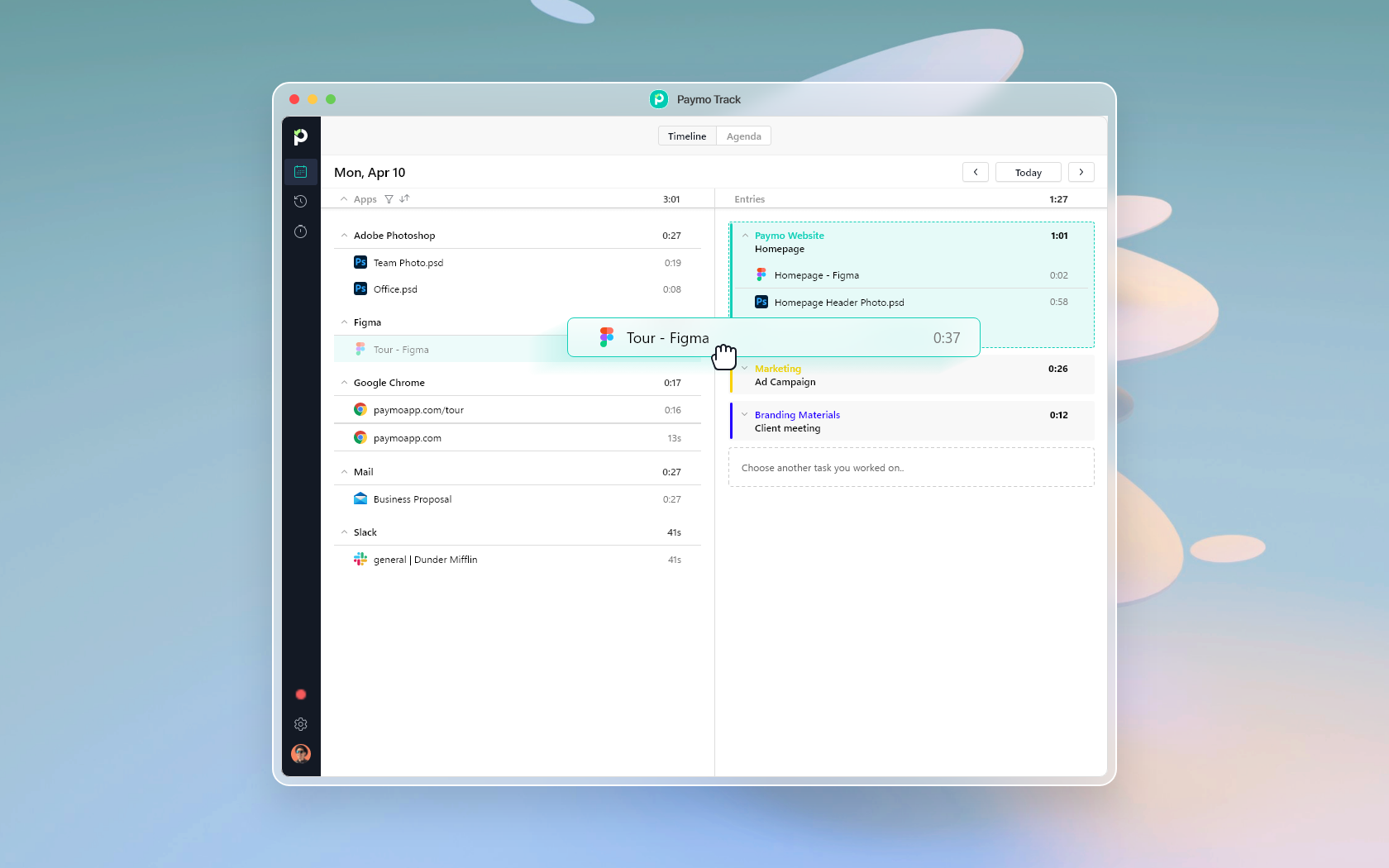
Paymo Track’s Agenda view lets you bundle timestamps into task entries.
If you regularly work with multiple projects simultaneously, this tool lets you match your activities to the right project and task at the end of the day.
This is the time-tracking method I’m using. Even though I remember to start and stop my timer each time, it gives me better time control, and there’s nothing else I need to do. It’s also helpful to identify my main distractions.
Next, all my recorded hours are sent into a timesheet.
Timesheets are physical or virtual proof of the time you’ve worked. Timesheet software allows electronic entries to be synced online in the cloud. Their primary use is within small companies for payroll and human resource management. Additionally, these are well-suited for consulting work and can be used by any creative business that needs time-tracking software.
Still, they also benefit employees by bringing transparency to the team, allowing everyone to work equal hours, and ensuring hours are justified. Finally!

Timesheets in Paymo
If you’re a remote worker and want something useful for yourself, then there are time reports. These visual summaries of work show how you allocate time, money, and other resources.
Having time reports on a remote team is excellent for reducing administrative tasks and discussions, and handing the rest to a virtual assistant agency keeps managers focused on the work that actually needs them. Your manager or team leader will immediately see if you’re overbooked or have time for another task without calling a meeting.

A live time report is updated whenever you click it.
Time tracking is a complex topic. Head to this article and read the benefits of time tracking if you want examples, and learn more about how time reports work.
Recommended tools for those working remotely
The digital apps you’ll use when working remotely fall into these categories: 1) work management software, 2) communication apps, and 3) industry-specific tools.
1. Work management software
I’ve just mentioned Paymo and how I use it to manage projects and business activities by tracking my time and organizing everything neatly. There are many more on the market, so see this article for a narrowed-down list of the best project planning tools. In addition to robust project management software, full suites such as Google Workspace, Microsoft Teams, and Atlassian Confluence are complementary tools.
These are cloud-based solutions, meaning you can share your files, for example, via Google Drive or another secure cloud storage provider. When working remotely, sharing documents is non-negotiable. You can either attach your files directly in your task management solution, e.g., in Paymo, you can review files directly in-app, or use Google Drive.
If you’re working in a team, read this article, 12 Best Tools for Remote Teams, for a more in-depth explanation and description of the best tools for remote teams.
2. Communication apps
You’ll probably need communication and collaboration tools when managing your work projects. Most work management software also offers those features. If you want dedicated apps, hundreds of software options make remote collaboration in any field a breeze. You need to know where to find them. I’ll list a few:
These are great for communication, collaboration, and screen sharing. Screen recording tools are crucial for remote workers to communicate and collaborate effectively with colleagues and clients who may not be physically present, saving time and effort while ensuring everyone is on the same page. Recording a Zoom meeting is essential to improve productivity and streamline communication in remote work.
Other collaboration apps allow you to sketch your ideas and assemble wireframes. For example, if you don’t want to call a meeting to show your colleague where a button is on a website, use a tool like Evernote to take screenshots and add text, arrows, and other shapes to highlight the points of interest. Better yet, use idea board software for that.
3. Industry-specific tools
Have a look at these design and prototyping tools that also have collaboration features:
- InVision – the most popular design and prototyping tool
- Mockplus – design, prototype & collaborate in one place
- Lunacy – a vector design tool often used alongside products like Figma, Sketch, Adobe XD, Axure RP, InVision, and Miro, that are commonly used by leading UI/UX design companies in the U.S.
- Marvel, Webflow, Framer – alternatives to InVision
- Kite Compositor – motion design and prototyping app
- Sketch – not available on Windows
- Figma – easy to use even if you’re not a designer
- Canva is not really for prototyping, but you can collaborate on other visual content, such as social media images, flyers, e-books, and more.
Options to help you with pair programming include:
Tips for project managers & team leaders
How to adapt to the constant changes in the work environment
Is remote working worth implementing in your office?
Most articles focus on helping employees understand what remote work implies, but this information would be redundant for the project if the team were not properly managed.
I included a section specifically for project managers because a remote team will not perform at its full potential without a strong leader.
Without further ado, these are the tips you should consider implementing as a project manager:
1. Focus on results rather than worked hours
If you clearly define your goals and desired outcomes from the outset, you have already helped your team better understand their tasks and, by default, persevere. This strategy helps with the following:
- better time management for both the employee and the project manager
- a clear understanding of tasks
- building team trust
- reducing focus from getting your hours into a better and more efficient task approach
This method is the best approach for increased team engagement and employee empowerment.
Suppose your main focus is on results rather than implementing rigid rules. In that case, your team will be more likely to communicate openly and focus on improvement as they work on the tasks.
2. Delegate more
You can sometimes give your team the freedom to make decisions. This shows that you can trust your team, and their trust in you and your project also grows.
For example, a product owner could assume some of the project manager’s responsibilities given their deeper understanding of product-specific tasks.
MIT Sloan Management Review states, “Managers of remote teams who improve their delegation skills can help solve the biggest impediment to their success: virtual distance.”
This is no surprise, as remote work can often lead to miscommunication due to the reliance on virtual tools such as text messages and video calls.
When running your team virtually, micromanaging—a terrible strategy—cannot be used, so a skillful delegation mindset is crucial for any project manager.
It reduces the tendency to micromanage your team and eliminates trust issues, breaking down barriers of physical distance through connection and emotional understanding in a team environment.
3. Be approachable and maintain constant communication
A healthy team is not afraid to ask questions. Embedding this principle in your team communication as a project manager would be best.
Team communication will be mainly work-related.
That should not mean building relationships with your teammates through social activities should be neglected.
Pro tip: Set aside time each week to discuss everyday things. This can be done both virtually and physically. Examples include:
- Playing your favorite video games
- Organizing a weekend outing
Studies have shown that building healthy, friendly relationships with teammates creates a more comfortable and well-rounded work environment.
4. Use video communication as much as possible
Video calls are a tremendous help for remote teams. It is easier to relate to your teammates and better understand their personalities and aspirations when you consistently use visual engagement in your work routine.
Most people said that when they first met face-to-face while working remotely and were constantly communicating with their team via video calls, they already felt as if they had known each other for years.
Tip: Don’t forget to use a talent assessment tool to assess candidates’ skills, personality traits, and interpersonal abilities while hiring remote workers.
Myths about remote work
Is remote work just a new way of working from home?
Although these terms are used interchangeably, there’s a subtle distinction between “working from home” and “working remotely.”
“Working from home” means the individual has a designated workspace in their residence, such as a home office or a dedicated area for work-related activities. The focus is on the physical location where work is carried out.
On the other hand, “working remotely” encompasses a broader concept. It refers to any work not conducted in a traditional office environment. While it can include working from home, it also encompasses other remote locations such as co-working spaces, coffee shops, or while traveling.
“Working remotely” emphasizes the flexibility of work location and the ability to carry out job responsibilities outside a centralized office.
The rest of the chapter will discuss more remote work myths.
1. “Remote work is for freelancers”
The grain of truth behind this myth is that most freelancers solely work remotely on various projects, BUT not all remote workers are freelancers.
A 2022 study by Buffer surveyed 2,118 people from 16 countries, finding that just over half (52%) of remote workers are employees, while 42% are independent business consultants or freelancers.
If you do not want to worry about your finances as a freelancer, you can choose to work remotely as an employee, given that many companies do offer an entire contract for this work type.
2. “You can only work from home”
One of the many benefits of remote work is the ability to travel. If you are an adventurer and can adapt to any environment, as long as you have safe internet, you don’t have any location constraints.
This is a significant benefit, especially for creative roles, as most people feel uninspired and constrained by a fixed work environment.
Years ago, getting a job in a nearby city would cause a lot of hassle. Long commuting hours or living in a rented apartment were sacrifices most people were expected to make. With remote work, this is no longer the case. For example, you could be employed at a US-based company while living on another continent.
By default, this drastically increases the pool of job opportunities for remote workers. You can now apply to jobs that don’t constrain you to a specific location.
If you love to travel, this is a significant benefit. Global location is no longer a requirement, so you can work from anywhere you want to.
Note that while traveling, you may lose focus while working if you are not good at time management. Even when traveling, ensure you remain fully focused on your tasks.
3. “Remote jobs pay less.”
This is refuted by numerous studies on remote work conducted post-pandemic.
While it may be true that working project-based makes it harder to earn a full wage, the more projects you take on, the more your salary will increase.
A study conducted by the Becker-Friedman Institute concludes:
“We find that 37 percent of jobs in the United States can be performed at home, with significant variation across cities and industries. These jobs typically pay more than jobs that cannot be done at home, accounting for 46 percent of all US wages. Applying our occupational classification to 85 other countries reveals that lower-income economies have a lower share of jobs that can be done at home.”
4. “Most jobs cannot be done remotely.”
Some job fields require on-site labor, yet many jobs you might’ve considered impossible at home are now adopting hybrid or fully remote work models. Examples include:
- Teacher
- Therapist
- Bookkeeper
- Medical coder
- Project manager
- Attorney
- Accountant
- Sales manager
- Recruiter/HR
All jobs have a specific work-from-home potential, defined by three dimensions: telecommutability (the ability to work remotely), technological infrastructure (e.g., Internet access), and geographic variation. This potential will increase as its three dimensions encounter fewer constraints.
The change in perception about remote work
From a frowned-upon tactic to a necessity.
Just ten years ago, full-time telecommuting was seen almost as an urban myth, considered a minimum wage, low-end job strategy by some, and by many a far-fetched alternative reality.
According to a GetApp study, remote work increased by 400% over the past decade, driven by significant advances in technology and data security.
Even before the pandemic, views on remote work were slowly changing, with more people embracing this trend.
According to this FlexJobs report, their remote job ads increased by 51% from 2014 to 2017.
You can also see the substantial rise in remote working opportunities in this past decade, clearly depicted in the following graphs provided by WeWorkRemotely:

Total Jobs Posted on WWR
Once the pandemic hit, working remotely shifted from a vague, improbable work style to a necessity.

Jobs PER category on WWR 2013-2020
We already know that remote work was one of the few options available regarding safety at the time. Still, it came with an exciting twist, yet often overlooked, precisely the new view of the workforce concerning their day-to-day jobs and work aspirations.
People have slowly become more aware of their needs and professional aspirations; this is clearly shown by the trend starting amid COVID-19 in early 2021, adequately titled “The Great Resignation.”
Once our health is at risk, we gradually acknowledge what we are willing to sacrifice for our jobs.
With ongoing inflation, employees are no longer satisfied with stagnant wages and their prior work conditions due to the continuously rising cost of living.
With that in mind, could remote work serve as a middle ground for companies and employees on long-term job satisfaction?
Zippia says, “75% of employees believe they have a better work-life balance working remotely. Other common benefits cited by employees include reduced stress (57%), fewer absences (56%), improved morale (54%), and fewer sick days (50%). 62% of workers feel remote work positively affects their work engagement.”
Studies conducted during and after the pandemic, when remote work was at its peak, have shown that employees are generally satisfied with the lower cost of living that remote work can provide.
The most frequently cited example among employees and employers is the elimination of commuting costs.
The biggest downside of remote work from a company’s perspective was always the ‘supposed’ decline in employee productivity when time constraints and in-office quotas were removed. However, according to a Prodoscore study, remote workers’ productivity increased by 47% during the March-April 2020 lockdown.
No wonder productivity has increased so much, considering that most employees who worked remotely during COVID have reported an increase in:
- physical and mental well-being
- personal development
- work-life balance management
- energy increase

As of 2022, only 2 out of 10 employees in the US were working a fully in-office job. Notably, these subjects come from all fields of work, some of which even require on-site labor.
Shifting from a full-time job to a remote role may not be easy for some people; issues such as reduced productivity, distractions, and poor time management are common if you are not yet fully accustomed to telecommuting.
How did remote work change after COVID-19?
How does the future look for remote workers?
Most people who have had the opportunity to work from home (and in fields that allow this work style) stated that, if given the opportunity, they would continue to work fully remotely or in a hybrid arrangement.
Data from post-COVID studies indicate that, as of 2023, remote work is more prevalent in developed economies, and most remote employees have higher education levels.
Gartner concludes after their study on remote work, “In Europe, where face-to-face interaction remains a preference, the hybrid style of work is projected to increase in 2023.
In Germany, fully remote and hybrid knowledge workers accounted for 49% of the workforce in 2023. Given their cultural and vertical industry mix, the number of fully remote and hybrid knowledge workers in the U.K. will rise over the same period.
Fully remote and hybrid knowledge workers will account for 71% of the U.S. workforce in 2023. In the U.K., fully remote and hybrid knowledge workers will represent 67% of its workforce in 2023.”
Surprisingly, the trend employers and employees have embraced since 2023 is hybrid work.
Ranjit Atwal, Senior Director Analyst at Gartner, said, “Hybrid is no longer just an employee perk but an employee expectation.”
Most people enjoy working remotely, but isolation can be a productivity killer, so it is no surprise that the new trend in work styles is the hybrid approach.

Gallup – Current and Anticipated Employee Work Locations
Post-pandemic, employee aspirations have changed, so as of 2023, companies are much more open to work designs that fit both employees and employers.
This new adaptation focuses on strategies such as:
- flexibility
- International collaboration
- empathy-based management
People who work in project-based roles are no longer satisfied with a 9/5 schedule in a full-time, in-office environment, making it clear that remote work (fully remote or hybrid) is here to stay.
What we’ve seen during the pandemic was just the “adaptation stage.” With this knowledge already at hand and the foundation of remote work already established, it seems telecommuting will not only be a forgotten trend but also the future of a more flexible, task-focused work environment.
Job listings to consider
If, after reading this article, you’ve decided remote work is for you, I would like to conclude with a few websites to help you get started. Check out their job listings below:
- Dynamite Jobs
- Jobspresso
- No Desk Project
- Remote Global
- Remote Work Hub
- Remoters
- We Work Remotely
- Working Nomads
- letsworkremotely
Conclusion
If remote work sounded like a fantasy a decade ago, today, it’s so widespread that it has become a reality for most companies and freelancers. Working remotely might require an initial investment in your tech equipment and digital tools, but you’ll save a lot more in commuting and work-related expenses.
Indeed, working from home successfully requires skills and suits some personalities better, but it’s a skill set that almost anyone can develop—you need the willingness to grow.
Start implementing best practices and tools, and return to this article to refine your processes. Chances are, remote work has already encroached on the work reality around you, so why not jump on the bandwagon and go places thanks to it?

Denisa Popescu
Author
Thanks to her expertise in Applied Modern Languages and her passion for copywriting, Denisa likes to embed creativity and analysis in her work. Through in-depth research, she has found a new passion for project management and personal time management, and enjoys anything that can further develop her creative thinking.

Alexandra Martin
Editor
Drawing from a background in cognitive linguistics and armed with 10+ years of content writing experience, Alexandra Martin combines her expertise with a newfound interest in productivity and project management. In her spare time, she dabbles in all things creative.